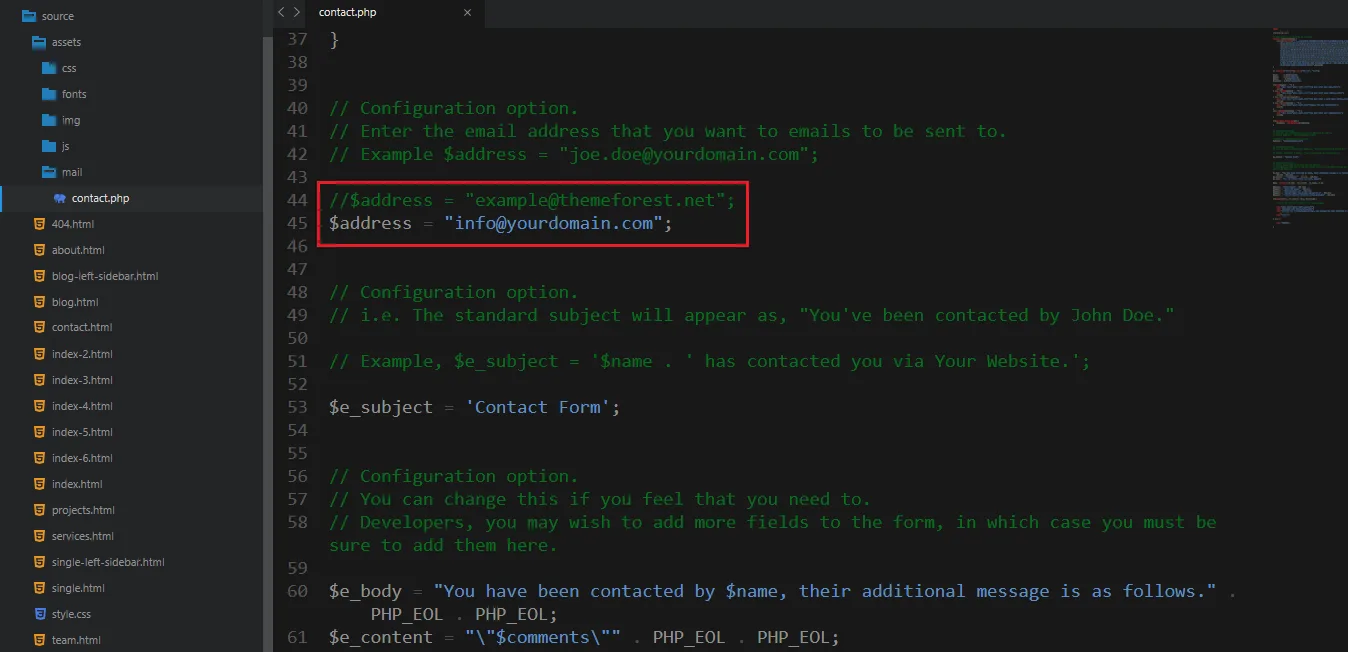
1. Modify your email here to receive emails from contact form:
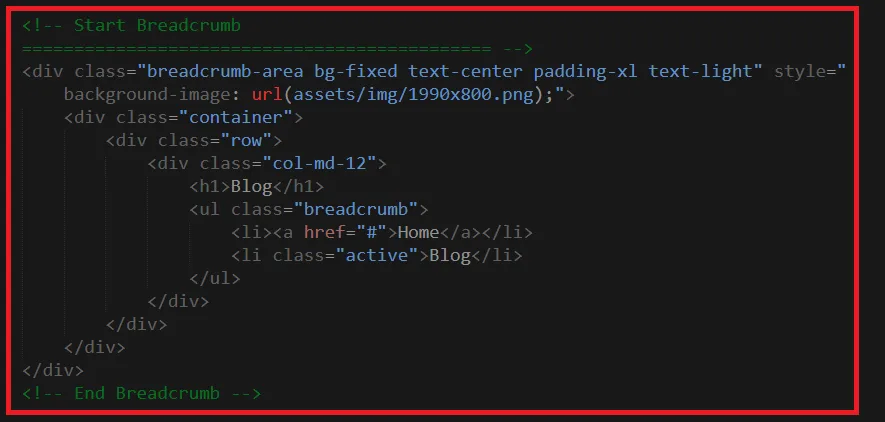
2. The way to move sections from one place to another:
Cut a section like the image below and paste it wherever you need
Boxass is a Responsive quick and easy customizable Modern Multipurpose SaaS, Startup & Software Landing Page Template that comes with 12+ valid HTML5 pages and 6+ home page variations. Boxass offers numerous awesome features like , software, app, app landing, app landing page, app landing template, App Showcase, app store, app template, app website, clean app landing, creative app landing page, promote saas, web apps, mobile apps and all kind of marketing websites, launching startups or your just a Blog. Well commented code, well-documented file structure and 24/7 professional and ultra-fast Support.
To edit this template with your info you will need a code editor, i use Sublime Text (http://www.sublimetext.com/3) and a browser i recommend to use Google Chrome.
It is really easy to use. There is multiple home page layouts to chose, also various selection of pages that you can use to create your website, but you can also create your own page layouts very easily (just copy and paste code form the elements examples).
When you start editing the template with your info is good idea to create separate folder, copy the assets folder and 404.html page there, rename one of the index... files to index.html and then move and edit pages that you will use. Also is good practice to create separate styleseet for your edits and load it bellow Boxass CSS.
Follow the steps below to setup your site template:
HTML/css - Stylesheet filesHTML/fonts – Icon font filesHTML/img - Image filesHTML/js - Javacript filesOnce you download the template, you can see a folder with several files and sub folders. You can read description of some important files in continue.
Boxass follows a simple and easy to customize coding structure. Here is the sample for your reference:
<!DOCTYPE html>
<html lang="en">
  <head>
    <title>Boxass - Startup Landing Page Template</title>

    <!-- ========== Start Stylesheet ========== -->
    <link href="assets/css/bootstrap.min.css" rel="stylesheet">
    <link href="assets/css/font-awesome.min.css" rel="stylesheet">
    <link href="assets/css/magnific-popup.css" rel="stylesheet">
    <link href="assets/css/owl.carousel.min.css" rel="stylesheet">
    <link href="assets/css/owl.theme.default.min.css" rel="stylesheet">
    <link href="assets/css/animate.css" rel="stylesheet">
    <link href="assets/css/bootsnav.css" rel="stylesheet">
    <link href="assets/style.css" rel="stylesheet">
    <link href="assets/css/responsive.css" rel="stylesheet">
    <link href="style.css" rel="stylesheet">
  </head>


  <body>

    <!-- Start Navigation -->
    <nav class="navbar navbar-default navbar-fixed white no-background bootsnav">

    </nav>
    <!-- End Navigation-->


    <!-- Start Main
    ============================================= --->
    <main>

    </main>
    <!-- END Main Content -->


    <!-- Star Footer
    ============================================= -->
    <footer>

    </footer>
    <!-- End Footer -->


    <!-- jQuery Frameworks
    ============================================= -->
    <script src="assets/js/jquery-1.12.4.min.js"></script>
    <script src="assets/js/bootstrap.min.js"></script>
    <script src="assets/js/equal-height.min.js"></script>
    <script src="assets/js/jquery.appear.js"></script>
    <script src="assets/js/jquery.easing.min.js"></script>
    <script src="assets/js/jquery.magnific-popup.min.js"></script>
    <script src="assets/js/modernizr.custom.13711.js"></script>
    <script src="assets/js/owl.carousel.min.js"></script>
    <script src="assets/js/wow.min.js"></script>
    <script src="assets/js/bootsnav.js"></script>
    <script src="assets/js/custom.js"></script>

  </body>
</html>
Boxass uses 2 fonts: Roboto & Poppins from the Google Fonts Library. You can change the fonts by following code
 @import url('https://fonts.googleapis.com/css?family=Roboto&display=swap');
 @import url('https://fonts.googleapis.com/css?family=Poppins:400,500,600,700,800');
We would really love to take this opportunity to appreciate guys whose items were helpful to us to make Boxass a really beautiful theme for our awesome users: